How to Get a Twitter Dev Account and API Key in 2026
Key Takeaways
- Apply for an X / Twitter developer account through the developer platform using an existing twitter account in good standing.
- You must describe your planned use, intended use, and use case of the twitter api, then accept the developer agreement and wait for review.
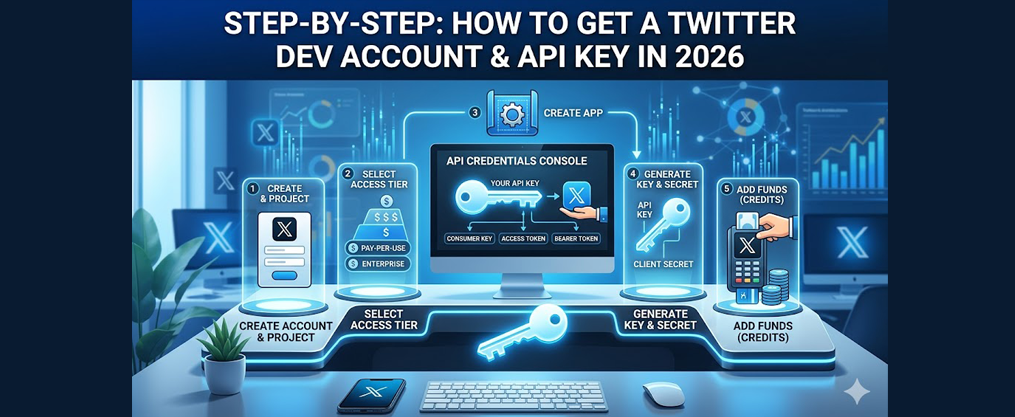
- Once approved, create a Project and App to generate your api key, api secret, bearer token, keys, and tokens.
- Approval may take days or weeks, especially for a government entity, sensitive data analysis, or high-volume access.
- Next steps: save credentials securely, test an endpoint, and monitor billing from the developer dashboard.
What Is a Twitter Developer Account?
A twitter developer account, now usually tied to an x account, lets developers use the Twitter API features and limits and developer platform beyond normal Twitter features. It is connected to a standard account but adds Projects, Apps, authentication, and API credentials.
Without an approved developer account, you cannot legally or technically call protected Twitter API endpoints at scale. Common reasons include school projects, internal tools, academic research, social automation, analytics dashboards, and tools that analyze twitter data such as tweets, timeline threads, specific hashtags, follower lists, regional trends, and public activity from twitter users, especially when taking advantage of Twitter API free data access.
Prerequisites: Prepare Your Twitter Account
Twitter first checks whether your standard twitter account is in good standing before granting developer access. To avoid instant application rejection for a developer account, the standard Twitter account must have a verified email address and phone number, a non-default profile picture, and a clear bio description; businesses may also want to switch to a Twitter Professional Account for branding before applying.
To apply for a Twitter Developer account, you must have a Twitter account in good standing, which includes verifying your email and phone number, and ensuring your profile is public. Add a header, website, GitHub, or institutional page. A few real tweets, followers, and a visible profile help prove the account is not anonymous, throwaway, or spam-like, and following a focused plan for getting your first Twitter followers can make the account look more legitimate.
How to Apply for a Twitter Developer Account (Step by Step)
Start at https://developer.twitter.com/en/apply-for-access, then log in and sign with your twitter account. The application process for a Twitter Developer account involves filling out a form on the Twitter Developer Platform, where you must specify your intended use case and accept the Developer Agreement.
At a high level, choose account type, fill in basic info, describe your primary use case, accept the rules, submit, confirm emails, and respond if Twitter asks for clarification. Keep answers specific and consistent with your actual plan.
Choosing Account Type and Access Level
Choose an individual developer account for personal tools, coursework, or a small app. Choose organisation, team, or Managed access when multiple users need to house work under one service.
Twitter offers three access levels for Developer accounts: Essential, Elevated, and Managed. Essential access is the basic level that allows users to access the Twitter API, while Elevated access provides additional permissions for more advanced features. Managed or enterprise-style access is for larger needs. Academic Research access is a special level that allows researchers to use the Twitter API with higher limits and additional endpoints specifically for academic purposes, which can be useful if you plan to study patterns in engaging Twitter post content at scale. Start low; upgrading usually requires another request.
Describing Your Planned Use and Use Case
This is the main delay point. In your own words, explain what you will create: “a dashboard that tracks @handle mentions and hashtags for support metrics.”
Describe whether the app will read tweets, post tweets, manage followers, or use DMs. Name each endpoint, frequency, users, and whether data is displayed, stored, sold, or shared; for example, automation tools like TweetFull require you to set this out clearly when connecting a Twitter account to TweetFull. If you will not resell Twitter data, say so. Answer government entity questions honestly; mark YES only if a government body will directly use the product.
Compliance, Data Handling, and Developer Agreement
Twitter asks how data will be stored, processed, displayed, and deleted. Explain retention periods, privacy controls, third-party tools, and cloud storage. Read and accept the developer agreement, automation rules, and restricted use policies, especially if your long-term goal is making money on Twitter through creator tools.
Avoid restricted activity such as surveillance, protected-class profiling, or misuse of personal data. Save a copy of your description and agreement date for audits, since you may need it later when you create a Twitter developer app for integration.
Approval Times and Common Issues
Review times vary. Historical user posts, including around March 2020, reported delays when Twitter adjusted its process. After submitting your application for a Twitter Developer account, you may need to wait a couple of weeks for a response regarding your approval status.
Simple cases may approve in days; complex projects may take weeks. Rejections often come from vague descriptions, unclear data-sharing plans, suspicious accounts, or restricted activities, and they also reflect broader questions about how Twitter can improve safety and engagement across the platform. If there is no update after 2–3 weeks, check spam, then contact developer