Twitter Header Specs & Banner Dimensions (Updated for 2026)
Key Takeaways
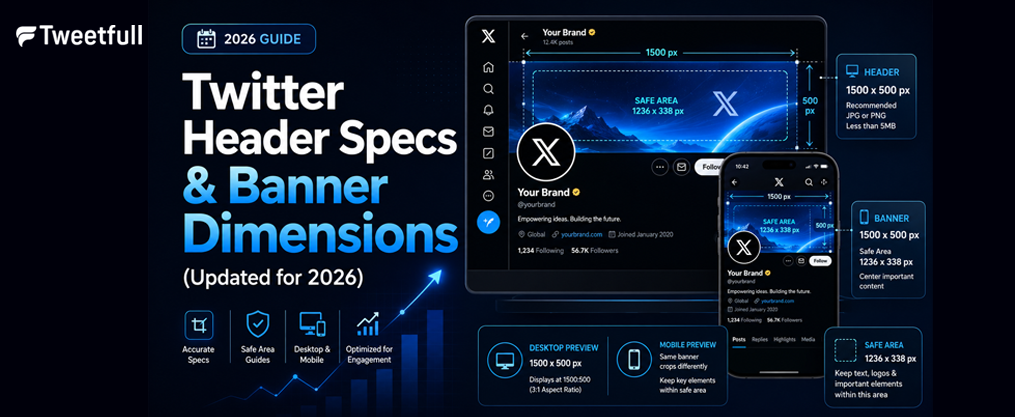
- The current recommended twitter header size is 1500 × 500 px with a 3:1 aspect ratio, and this has remained unchanged since the X rebrand in July 2023.
- Your header image is partially covered by the 400 × 400 px profile picture, which displays at roughly 200 × 200 px on most screens and overlaps the bottom left corner of the banner.
- Safe zones for important text and logos should be centered or shifted to the right, well away from the bottom-left area to avoid overlap and cropping on smaller screens.
- JPG and PNG are the most reliable formats for header photos. The maximum file size is 5 MB, but staying under 2 MB is recommended for the sharpest results.
- Twitter header specs differ from other platforms, so banners usually need to be resized rather than reused directly.
Introduction: Why Twitter Header Specs Matter
Your twitter header is the single largest visual element on your profile page. Whether you call it a banner, header photo, or cover image, it dominates the top of every account and shapes the first impression visitors have of your brand.
The header image works alongside your profile photo to create a cohesive visual identity. Getting the header dimensions wrong leads to blurriness, awkward cropping, and content hidden behind the profile picture. Despite the fact that specs have been stable since X (formerly twitter) rebranded in July 2023, conflicting numbers still circulate online.
This article gives you exact twitter header specs for 2026, along with practical layout tips, format guidance, and answers to common questions.

Official Twitter Header Dimensions in 2026
Twitter recommends a header size of 1500 × 500 pixels, maintaining a 3:1 aspect ratio. The minimum accepted size for twitter headers is 600 × 200 pixels, but uploading at that resolution will produce a pixelated, blurry result on any desktop computer or high-DPI screen. Always upload at the full recommended 1500 × 500 px for sharpness.
On many mobile devices, the display area is closer to ~1200 × 400 px, but the higher-resolution upload ensures the image scales cleanly across every device.
Key file specs at a glance:
Spec | Value |
|---|---|
Recommended dimensions | 1500 × 500 px |
Aspect ratio | 3:1 |
Maximum file size | 5 MB |
Recommended file size | Under 2 MB |
Supported formats | JPG, PNG, GIF (static only) |
Twitter headers can be uploaded in the following formats: jpg, png, or gif. Use jpeg for photo-heavy headers and png for graphics with sharp edges, logos, or text. Banner image file sizes over 2 MB tend to get re-compressed aggressively by X’s servers, so save your export lean. |
Safe Layout: How the Profile Picture Affects Your Header
On desktop, the circular profile picture overlaps the bottom-left corner of the header. The recommended upload for the profile photo is 400 × 400 px, which typically displays at around 200 × 200 px on the profile page.
In practical terms, roughly a 400 × 400 px square area in the left corner of a 1500 × 500 banner can be partially covered by the avatar, username, and bio text. Keep important content away from the bottom-left corner. Logos, faces, and key text should be centered horizontally and positioned in the upper portion of the header instead.
On mobile, the profile picture overlaps slightly differently and vertical cropping can vary depending on the device. Always preview headers on both a browser and the X mobile app before going live.
Keep logos, CTAs, and critical messaging away from the left edge and bottom of the banner to ensure they remain visible everywhere.
Cropping, Safe Zones, and Responsive Behavior
The visible header area can vary depending on screen size, browser window width, and device orientation. Header images can be cropped slightly at the top and bottom on different devices, sometimes losing 40–60 px from each edge.
Important elements should be placed in the top two-thirds of the header image to avoid cropping. The safe area for important content in a twitter banner is centered or to the right, within roughly the central 1340 × 340 px of the canvas.
Practical safe zone guidelines:
- Top and bottom: Leave at least 60 px padding from each edge.
- Left and right: Keep critical content 80+ px from the left edge and right edge.
- Bottom-left quadrant: Treat as a no-go zone for text and logos.
Do a quick live test. Upload a draft header, then check it on a laptop browser and the twitter mobile app. What looks perfect on one device can be cropped on another, and a two-minute check saves hours of redesign.
Design Best Practices for Twitter Header Images
Once your x header image meets the correct specs, design choices for your twitter background determine how professional your page looks.
- Use high-resolution photos or illustrations that match the 3:1 aspect ratio instead of stretching a random image.
- Keep composition simple: one focal area, limited text, and enough space around important elements.
- When you add text, use large, high-contrast fonts and short phrases placed near the center. Avoid small or thin fonts that degrade after compression.
- Showcase brand identity through a product lineup, event promotion, or portfolio work while matching colors with your profile picture and tweet graphics.
A great example of effective header design is a single bold message with ample negative space. Overly busy banners with multiple graphics and dense copy tend to look cluttered, especially on smaller screens.
Technical Specs vs. Other Twitter Images
Your x twitter header occupies a completely different aspect ratio than post images, profile photos, and twitter cards. Here’s a quick comparison:
Image Type | Recommended Size | Aspect Ratio |
|---|---|---|
Header / Banner | 1500 × 500 px | 3:1 |
Profile photo | 400 × 400 px | 1:1 (circle) |
In-stream post image | 1200 × 675 px | 16:9 |
A common mistake is reusing a standard 16:9 social image as a twitter banner without resizing. That approach forces severe cropping or letterboxing on the profile. Keep a separate header file in your design workflow so you can update it independently of post graphics. |
Twitter Header Size vs. Other Platforms
Each social platform has its own banner or cover image requirements. A one-size-fits-all header is unrealistic.
- Facebook cover photos use a wider format at 820 × 312 px (desktop display).
- LinkedIn background images sit at 1584 × 396 px.
- YouTube channel art requires 2560 × 1440 px with a much smaller safe area.
Twitter’s 3:1 header dimensions are narrower and more panoramic than most other platforms. Don’t crop a twitter banner directly for use elsewhere. Instead, reframe the same artwork to fit each site’s specs. Multi-artboard design tools make this process fast, keeping your brand consistent without sacrificing quality.
How to Create and Export a Twitter Header
Any modern design tool that supports custom canvas sizes can create images at 1500 × 500 px. Canva offers millions of templates for twitter headers. Figma provides pre-sized templates for twitter headers as well. Snappa includes safe zones in its twitter header maker, which is especially helpful for avoiding the avatar overlap area.
A simple workflow:
- Set your canvas to 1500 × 500 px.
- Place your background photo or brand colors.
- Add your logo and text in the center, avoiding the bottom-left safe zone.
- Work in RGB color mode (sRGB profile) at 72–150 DPI.
- Export as high-quality jpg for photo headers or png for flat graphics with sharp edges.
- Check the final file size. If it exceeds 2 MB, compress slightly before you upload. Staying well under the 5 MB limit prevents aggressive platform compression.
Resize your header for each social platform separately rather than forcing one export to do double duty across other platforms, and focus on layouts that support higher twitter impressions and engagement.
FAQ
What is the best Twitter header size to avoid cropping in 2026?
The answer is 1500 × 500 px with a 3:1 aspect ratio. Keep key content in the central area to minimize visible cropping. No single size can guarantee identical display on every device, but this dimension with a centered layout gives the most reliable results across desktop and mobile.
Can I use the same header image on Twitter and other platforms?
You can reuse the same base artwork, but it usually needs to be resized and repositioned. Each social platform has different cover photo dimensions. Create separate versions of the banner for twitter, Facebook, LinkedIn, and YouTube to keep text readable and prevent unwanted cropping.
Why does my Twitter header look blurry even at 1500 × 500 px?
Heavy jpg compression, low-quality source images, or enlarging a small photo are the usual culprits. Export from a high-resolution original, use moderate compression (keep file size under 2 MB), and avoid overly noisy or heavily filtered pictures. X’s servers will re-compress large files, which can introduce additional artifacts.
Can I use an animated GIF as my Twitter header photo?
Twitter does not support animated gifs in header images or profile photos. While gif is an accepted format, the platform will display only the first frame as a static image. Save your animations for tweets and video posts instead, where they’ll actually stand out for your audience.
How often should I update my Twitter header?
Update your header when branding changes, major campaigns launch, or seasonal events occur. For active brands, that might mean every few months. Frequent but intentional updates keep your profile page fresh and signal to users that the account is active, without confusing followers through constant rebranding. Explore new layouts each quarter to keep your message current.