Twitter Ads: A Step by Step guide for marketers
If you were under-estimating the potential of Twitter marketing until now, it is the time to think again! With hundreds and thousands of tweets made every day, the potential of making your brand’s voice reach to your audience is limitless. But, the normal tweets that you make may get lost somewhere in the huge tweet stream. And, that’s where Twitter ads come to the rescue.
Twitter ads reach over 611 million active monthly users, providing a vast advertising potential for brands to promote their products and services directly to their audience.
With 330 million monthly active users, Twitter is a platform that provides effective and most precise targeting options to make your post visible to the right people at the right time. Twitter offers various ad placements, including premium spots within a user’s timeline, to maximize visibility and engagement.
Advertising on Twitter
When you run ads on Twitter, it works as a supplement to your organic growth efforts. Twitter Ads can also amplify well-performing organic content, allowing you to boost posts and reach a broader audience. Additionally, integrating Twitter advertising with other social media platforms helps create a unified marketing strategy and streamlines campaign management. You can promote individual tweets or an entire campaign dedicated to specific objectives. There are 8 objectives from which you can choose the one that suits your goals.
Using Twitter advertising, you will be able to keep your tweets in front of the people who don’t yet follow you, and increase the chances of getting genuine leads and conversions. All this can be done without spending a fortune – you can start with a minimum budget! If you want to make the most of your budget, it’s best to have an effective Twitter promotion strategy. Twitter is recognized as a cost-effective advertising solution compared to other social media platforms, offering high ROI for businesses. Promoted Ads on Twitter are paid placements that appear in user feeds or search results, helping you reach your target audience efficiently.
Twitter advertising also enables brands to engage in real-time conversations and tap into trending topics, making it a dynamic tool for digital marketing.
What is Twitter Advertising?
Twitter advertising, now rebranded as X advertising, is a powerful way for businesses to promote their products or services directly on the X platform. X ads operate on a pay-for-performance model, meaning advertisers only pay when users take specific actions—such as clicks, engagements, or conversions—rather than just for impressions or passive views. This makes Twitter advertising a cost-effective solution for reaching your target audience and boosting your brand’s visibility.
With a variety of ad formats available, including Promoted Tweets, Carousel Ads, and Video Ads, you can tailor your campaigns to fit your marketing objectives. Promoted Tweets help you amplify your message to a broader audience, while Carousel Ads allow you to showcase multiple images or products in a single swipeable ad. Video Ads are perfect for capturing attention with dynamic video content. By leveraging these ad formats, you can ensure your ads stand out and drive meaningful results for your business.
Types of Twitter Advertisements
1. Tweet Promotion
This is when you promote a single tweet. Promoted tweets are a type of Promoted Ad, which are paid placements that appear in user feeds or search results. Promoted tweets look just like normal tweets, with a label saying “Promoted” at the lower left-hand corner. They can also consist of videos and are auto-played whenever it appears on the feed of viewers. In case the video is less than 60 seconds, it plays on a loop.
When using tweet promotion, it’s important to craft engaging ad content that aligns with your campaign objectives. Monitoring engagement metrics such as likes, comments, shares, and clicks helps you assess the performance and relevance of your promoted tweets.
2. Account Promotion
Here, you can promote your entire account instead of just a single tweet. This ad type is known as promoted accounts. Your account is placed in the timeline of people who can be your potential customers and also shown in the “Who to follow” section. Along with the label of “promoted”, a follow button is also shown in the promotion.
Follower ads typically cost between $2 to $4 per follow, making promoted accounts a cost-effective way to boost your visibility and increase your follower count.
3. Trend promotion
Twitter is known for the “Trending topics” that make us familiar with the discussions that the world around us is making. It is a great collection of hashtags and topics being used in real-time.
Timeline takeover and X Takeovers are premium ad formats that place your ad at the very top of users’ timelines or trending sections for maximum visibility. X Takeovers provide premium ad placements on X’s most valuable real estate, both on desktop and mobile.
When you promote a trend, it shows up on the first positions in “Trends for you” section, and thus can reach an immensely wide audience.
4. Moments Promotion
Twitter Moments can be created using a desktop and is basically a collection of tweets that dictate a story. When you choose to promote moments, you are no longer limited by the 280 characters! You can also choose to sponsor other’s brand moments if you have a large number of followers.
Additionally, X Live allows brands to stream events in real time to a global audience, providing another way to engage users beyond Moments Promotion.
5. App cards
Through this promotion, you will be able to present your app to the audience inside a tweet in a super engaging manner. An install button will be incorporated in it, and the viewers can directly download your app by clicking on it.
To maximize results, ensure your App Card creatives are optimized for mobile devices and feature compelling visuals, as 97% of users focus on visuals when engaging with Twitter ads.
Which Ad type is best for your business?
When you are running any contest on Twitter through a tweet and want maximum people to take part in it, or when you are sharing important information, selecting the appropriate campaign type and defining clear campaign goals is essential. Tweet promotion will be the best option in this case.
When gaining followers and making people aware of your account is your main motive, you should opt for account promotion, as a follow button is inserted in the tweet. This campaign type is ideal for objectives focused on increasing awareness and consideration.
If you want to promote a topic and wish for people to interact with it, trend promotion is there for you, as the promoted topic will directly appear in the trending topics of your target audience. Choosing the right campaign type helps align your strategy with your campaign goals, such as boosting engagement or reach.
When you have an app and would like to increase the installs, you can use the app cards feature.
A/B testing different ad formats and creatives is important to identify what resonates best with your audience and to boost purchase intent.
76% of Twitter users say they purchase a product based on Twitter threads and conversations.
Aligning Twitter Ads with Your Business Goals
To get the most out of your X ad campaigns, it’s essential to align them with your overall business goals. Start by defining clear campaign objectives—whether you want to increase website traffic, boost engagement, or drive conversions. Selecting the right ad formats and targeting options is key to reaching your target audience effectively.
X ads offer precise targeting options, such as keyword targeting, interest-based targeting, and tailored audiences, allowing you to connect with users who are most likely to be interested in your offerings. By matching your campaign objectives with the right targeting strategies, you can maximize your ad spend and achieve measurable results. Whether your goal is to generate leads, raise brand awareness, or drive sales, aligning your X ad campaigns with your business goals ensures every ad works toward your success.
Get started with your first Twitter Ad
1. Set up your Twitter Ad account
To set up a Twitter ad campaign, you must create a Twitter Ads account and log in using your existing Twitter credentials. Begin by accessing the twitter ads account log at “Ads.twitter.com”, where you will be prompted to fill in your country and time zone to proceed with setting up your ads account.
2. Choosing the right objective
As discussed earlier, Twitter blesses you with 8 different campaign objectives. Choosing the right one is extremely important to make the ad worthwhile. These objectives are:
- Reach: Choose this when you want to reach the maximum number of people and improve your brand visibility. You will be charged per 1000 impressions.
- Pre-roll views: When you select this, you can run a short video at the start of videos from Twitter’s premium content partners, much similar to the ads on YouTube.
- Video views: When you promote a video and just want people to watch it, select this. You will be charged for every view.
- App installs: You will be charged for whenever a person installs your app from the ad.
- Website clicks: Whenever a person goes to your website by clicking on the link in the ad, you will be billed.
- Engagements: Choose this when you wish to gain the maximum Twitter engagement on your promoted tweet.
- Followers: This works best when you want to increase followers on your Twitter account. You will be charged for every new follower.
- App re-engagements: When people already have your application on their phones, and you want them to open and use it, select this objective.
3. Campaign details
Once you decide the perfect objective, use the Ads Manager to select the appropriate campaign type and define your campaign goals. This ensures your Twitter ads are aligned with your overall marketing strategy and optimized for the results you want.
- Set a proper name from which you can identify the twitter promotion.
- Enter a funding source (credit/debit card) from which payments will be made.
- Twitter allows you to set either a daily budget, which limits how much will be spent each day, or a total budget for your campaign.
- Select the start and end date. If you do not choose the end date, the campaign will stop when the amount is used completely.
4. Select the ad group and bidding
You can split your campaign into different ad groups if you want to target different audiences, use different creatives, or carry out A/B testing. When you are just starting out, go for a single ad group.
Twitter uses an auction system where your bid competes with others, and advertisers pay based on their bid amount and ad quality. Higher quality scores can lead to lower costs for advertisers.
Advertisers can choose from three bidding strategies: automatic bids, maximum bids, and target bids to control spending.
- Enter a name for your ad group.
- Select the start and end timings. (It is optional, just leave it empty when you are adding only one ad group)
- Total ad group budget will also be the same as the campaign budget. You can set it in case of different ad groups.
- It is recommended to set the bid type to automatic. Twitter will optimize your bid to get the best results.
5. Choose your target audience
Now is the time to fulfill the main purpose of your ad – make it reach the right target users based on interests, behaviors, and keyword usage. Twitter’s advertising platform allows you to target users with advanced options, ensuring your ads are shown to the most relevant audience segments.
- Gender – If your product is gender-specific, select the gender you are targeting.
- Age – Select the age group of people who can possibly be interested in your products or services.
- Location – You can go as specific as your city or postal code, and as broad as the entire country or continent.
- Platforms – Here, you can select the device type on which you want your ads to be displayed.
- Audience features – Enter the interests, keywords, events, movies, TV shows, and follower look-alikes, on the basis of which you would like to target users. You can also use tailored audiences to reach specific target users based on their interactions and behaviors on the platform.
- You can also retarget people who saw or engaged with your past tweets.
Additionally, Twitter’s audience insights tool provides valuable information about the interests, behaviors, and demographics of your followers and those who engage with your tweets, helping you refine your targeting strategy.
6. Creatives
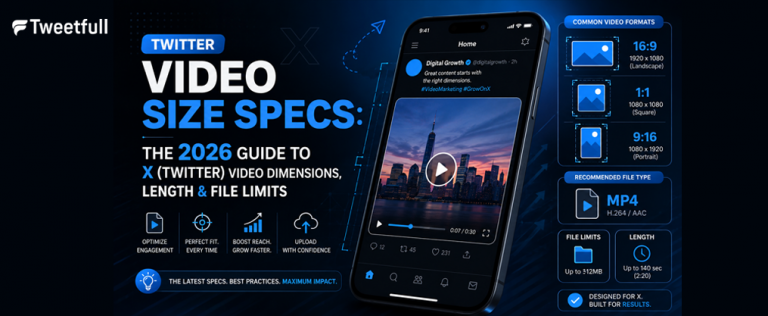
Content is the king! When you create ads on Twitter, focus on compelling ad content that aligns with your campaign objectives and is tailored to your target audience. Make sure you include eye-catching creatives and relevant emojis while writing tweets. Use images that are vibrant so that they can stand out in the crowd, as 97% of users focus on visuals when engaging with content. Always include a strong call-to-action (CTA) in your Twitter ads to guide users on what action to take next after engaging with the ad. If you are uploading a video, it will perform the best if it is between 10-15 seconds. For more tips on making perfect videos for Twitter, check out this guide.
7. Choose Ad Placement
Now, select your ad placements, including the user’s timeline, profiles, and tweet detail pages, which are selected by default. You can also choose additional ad placements such as Search results. Optimizing ad placements based on where users engage the most can significantly improve the effectiveness of your Twitter ad campaigns.
Now review all the selections that you have made and click on “Launch Campaign” to start your ad!
Creating a Video Ad
Launching a video ad on X is a great way to engage your audience with compelling video content. Begin by defining your campaign objective—do you want to increase brand awareness, drive website visits, or encourage app installs? Next, select the video ad format that best fits your goal, such as a standard video ad or a promoted carousel video ad.
Upload your video content, making sure it meets X’s video ad specs for optimal performance. Add a catchy headline, a concise description, and a strong call-to-action (CTA) to encourage users to take the next step. To ensure your video ad reaches the right users, use tailored audiences, keyword targeting, and interest-based targeting. By following these steps, you can create a video ad that not only looks great but also delivers results.
Twitter Auto promote mode
In case you do not have the time to go deep into the targeting stuff, you can try the Twitter quick promote mode. It is basically a promotion engine that is always on and does all the things automatically.
You can set a monthly fee and your accounts, as well as tweets, will get promoted automatically. To know how your ads are performing, you can check twitter analytics from time to time. Monitoring campaign performance using analytics tools and regularly adjusting your campaigns based on metrics like impressions, engagement rates, and conversions is crucial for optimizing Twitter ads.
For greater transparency, you can view all the ads currently running on the platform using the X Ads Library, which is useful for competitive analysis. If you’re interested in video advertising, X Amplify Ads lets you align your ads with video content from relevant brands, and amplify pre-roll allows your ads to play before the main content, targeting viewers based on curated content categories.
Measuring Campaign Performance
Tracking the performance of your X ad campaigns is crucial for understanding what’s working and where you can improve. Use X’s built-in analytics tools to monitor key metrics such as impressions, clicks, engagements, and conversions. Keep a close eye on your ad spend and adjust your budget allocation based on how your ads are performing.
X ads provide detailed metrics like cost per click (CPC), cost per thousand impressions (CPM), and return on ad spend (ROAS), giving you the insights needed to make data-driven decisions. By regularly reviewing your campaign performance, you can identify trends, optimize your ads, and ensure you’re getting the best possible return on your investment.
Optimizing Your Twitter Ad Campaigns
To get the most out of your X ad campaigns, ongoing optimization is essential. Start by ensuring your ad creative is eye-catching and relevant—use vibrant images, clear messaging, and compelling ad copy to capture attention. Next, refine your targeting by leveraging keyword targeting, interest-based targeting, and tailored audiences to reach the right users based on their interests and behaviors.
Adjust your bidding strategy to maximize your results. X offers several bidding options, including automatic bidding, which lets the platform optimize your bids for the best outcomes, as well as maximum and target bidding for more control. By continually testing and refining your ad creative, targeting, and bidding strategy, you can improve your campaign performance, reach your marketing objectives, and connect with the right audience for your business.
Pre-requisites
Before you start running ads on Twitter, make sure that your account is well updated.
- Keep your profile picture and cover photo as something that resonates with your brand.
- Edit your bio, put links to your website, and add your location.
- There should be a considerable amount of followers too, so that the people who see your ad can consider following you.
- Tweet regularly, and engage with your followers on a continuous basis to build an identity.
- Ensure your ad stands out by using strong visuals and clear messaging to reinforce your brand and improve ad performance.
- Optimize your profile and tweets to drive website conversions, making it easy for users to take action after seeing your ads.
- Well-crafted ads can foster brand loyalty, especially since many Twitter users are brand loyalists who can amplify positive sentiments about your business.
- If you don’t have enough time to get into this, you can use a Twitter automation tool that can help you in gaining engagement. There are many tools available out there, like TweetFull, TweetStats, Tweriod, and others, that can provide you amazing results in building your profile and obtain free twitter followers.
- In order to make your brand reach a huge chunk of audience in just a small period of time, you can also approach Twitter influencers to promote your brand.
Takeaway
With the right combination of targeting, creatives, and profile optimization, your brand will be able to generate profitable leads using Twitter! Also, do not ignore what’s working well in organic tweets. Learn what kind of tweets are gaining more attention, and try to incorporate the insights while advertising on Twitter for business.
Leverage Twitter’s real-time conversations to engage with trending topics and connect with your audience in the moment, making your marketing timely and relevant. Focus on driving website conversions by selecting the right Twitter ad formats to encourage user actions and maximize campaign effectiveness. Remember, Twitter provides transparent analytics that enable you to monitor campaign performance in real time and adjust your strategies promptly for better results.
So, take the plunge and launch your first Twitter ads campaign!
To know the tips on how to build twitter engagement organically, click here!