How To Get X Developer Account in 2026 (Step-by-Step)
Getting programmatic access to X requires more than just signing up. This guide walks you through the complete process of obtaining your x developer account, creating an app, and securely storing your credentials—so you can connect tools like TweetFull and start automating growth the right way.
Key Takeaways
- You need an active x account first, then apply for a developer account through the x developer portal, and finally create an app to get your api keys and tokens
- As of 2026, applications go through the all new developer console with an updated interface, featuring consumption-based billing and transparent pricing that replaces the old subscription based pricing model. Developers can monitor consumption in real time and choose between free or paid access tiers based on their needs.
- You must provide accurate details about your intended use—whether that’s scheduling posts, analytics, or automation with compliant tools like TweetFull
- After approval, create an app inside the developer console, then generate and securely store your consumer key, api secret, access token, and Bearer token
- A properly configured developer account is mandatory for connecting growth tools to X while respecting rate limits and platform rules
What Is an X Developer Account and Why You Need It
An x developer account unlocks access to the x api, enabling you to build automated apps, analytics dashboards, and compliant engagement tools. The new developer console also enhances the developer experience by simplifying user interaction and offering flexible, consumption-based billing without fixed monthly costs. Without it, you cannot programmatically interact with the platform.
The difference is straightforward: a regular x account lets you tweet manually, while a developer account grants programmatic access via the api. All tools like TweetFull, content schedulers, and usage analytics platforms rely on this api access to function.
Common use cases in 2026 include:
- Auto-posting and content scheduling
- Audience analytics and trend analysis using the X API’s features and limits
- Compliant engagement automation (likes, retweets, follows)
- Real time tweet streaming for dashboards
The new system is designed to lower barriers for small developers, making access more accessible and cost-effective.
Since X tightened automation policies after 2023, having a properly configured developer account with correct app permissions is critical for staying compliant and avoiding account restrictions. Costs now scale proportionally with usage, helping developers avoid sudden tier jumps and making expenses more predictable.
Prerequisites Before You Apply
Before starting the application, prepare these essentials to streamline approval. If you specifically want to connect your account to TweetFull, you can also follow a dedicated step-by-step guide to create a Twitter developer account.
Account requirements:
- An active x account with verified email address and phone number
- Two-factor authentication (strongly recommended for security)
- A complete profile with name, avatar, bio, and website link
Define your use case clearly. Reviewers want specifics like “schedule posts and analyze engagement for my SaaS” rather than vague descriptions. If you’re connecting third-party tools, mention them explicitly—for example, “TweetFull used to automate likes and retweets within X’s rate limits.”
Prepare a short app info description before starting. Applications with detailed, honest use cases see faster approvals.
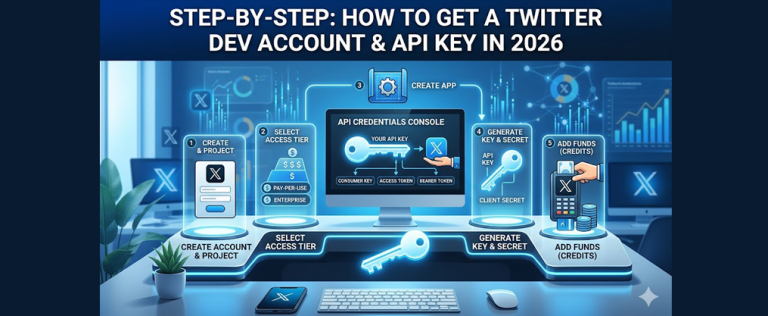
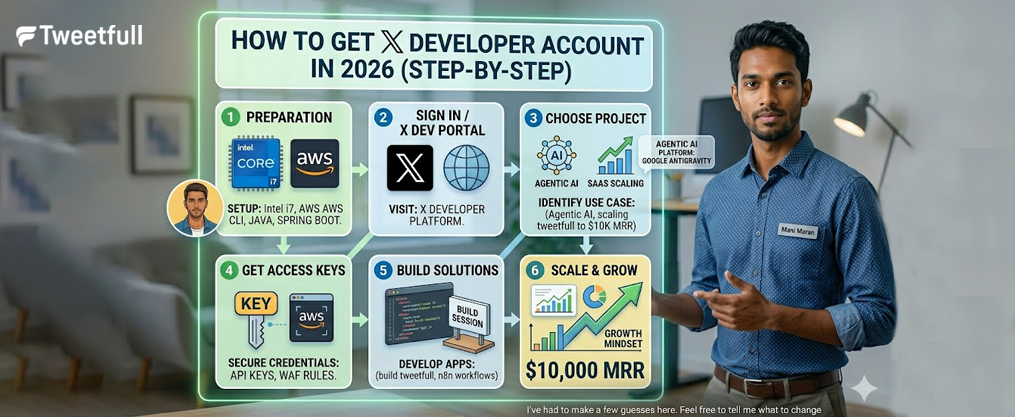
Step‑by‑Step: How to Get Your X Developer Account (2026)
Here’s the chronological walkthrough to create your x developer account as of May 2026.
1. Navigate to the Developer Portal
Go to the official x developer dashboard at developer.x.com (URLs may change, so verify the current official link).
2. Sign in with your X account
Log in using your existing x account credentials. Locate the “Apply” or “Developer Portal” button to begin.
3. Select your access level
The application process includes selecting an access tier. Choose based on your needs. Unlike traditional subscription based pricing models, X’s tiers are structured with fixed monthly fees rather than pay-per-use options:
Tier | Best For | Key Features |
|---|---|---|
Free | Testing, light posting | 500 posts/month, limited reads |
Basic ($200/month) | Hobbyists, prototypes | 50,000 app posts, 15,000 reads |
Pro ($5,000/month) | Scaling businesses | 300,000 posts, 1M reads, streams |
Free access is extremely restricted and typically reserved for public utility apps on a case-by-case basis. |
4. Complete the application form
Developers must provide a use case description explaining their project’s goals and how they will handle X data. Include:
- Whether you’ll read data, write content, or both
- Personal vs. commercial use
- Third-party tool connections (mention TweetFull if applicable)
- Your commitment to respecting automation rules
5. Accept the developer agreement
You must accept the developer agreement and policy, which covers automation rules, data handling, and spam prevention requirements updated since 2023.
6. Submit and wait
Straightforward applications often receive instant approval. Complex use cases involving bulk data or large-scale automation may trigger manual review lasting hours to days. Respond promptly to any follow-up questions from X.

Creating Your First X App Inside the Developer Portal
After your developer account is enabled, you need to create an app to actually obtain api credentials. To obtain api keys and tokens for the x api, developers must first create an app after signing up for a developer account.
Navigate to Projects & Apps
In the developer console, find the “Projects & Apps” section. Create a new project, then add an app within it.
Configure your app:
- App name: Something descriptive like “TweetFull Growth Integration” or “Brand Scheduler 2026”
- Description: Detailed explanation of your app’s purpose
- Website URL: Your business site or portfolio
- Callback URI: Required for OAuth flows if using user authorization
Set app permissions
If you intend to post content, you must set your app permissions to ‘Read and Write’. Developers must manually update their app settings from ‘Read-only’ access to ‘Read and Write’ if posting is intended. For TweetFull integration, read and write is standard.
Request only the minimal scopes you truly need—over-requesting can slow approvals and flag your application as high-risk.
Getting and Safely Storing Your API Keys and Tokens
This step generates the sensitive credentials your tools use to access X on your behalf. Once you have created your app, you will receive several credentials that are necessary for authentication.
Credentials you’ll receive:
Credential | Purpose |
|---|---|
API Key (Consumer Key) | Identifies your app |
API Key Secret | Signs requests with API Key |
Bearer Token | App-only read access |
Access Token | User-context actions |
Access Token Secret | Signs user actions |
Find these in the “Keys and Tokens” tab of your app within the developer portal. |
Security best practices:
Api keys and tokens are sensitive credentials that should be stored securely, using environment variables or secret management tools to prevent unauthorized access. Never:
- Share keys publicly
- Commit them to GitHub (a common leak vector)
- Expose them in client-side code
Store credentials using environment variables, password managers like 1Password, or cloud secrets managers like AWS Secrets Manager. If keys are compromised, regenerate them immediately—this revokes old keys and requires re-connecting tools like TweetFull, which also has a detailed TweetFull FAQ covering setup, security, and billing.
Which Credentials and Permissions Do You Actually Need?
Different use cases require different credentials. Over-requesting permissions slows approvals and increases scrutiny.
X supports both OAuth 1.0a and OAuth 2.0 for authentication, with OAuth 2.0 being recommended for actions that require user permissions, while OAuth 1.0a is simpler for server-side applications.
Credential use cases:
- Bearer Token: Read-only tasks—pulling timelines, follower lists, built trend analysis dashboards or exporting a Twitter follower list efficiently for analysis and outreach
- Access Token & Secret: Required for create creating posts, liking, following, retweeting, and create creating dm interactions
A simple analytics tool only needs read access. TweetFull-style automation requires read + write scopes to create creating user interactions on your behalf, and is most effective when paired with organic Twitter growth tools and services.
For agencies managing multiple client profiles, use separate access tokens per account. This keeps activity isolated and easier to audit or revoke if needed.
Connecting Your Developer Account to TweetFull (and Similar Tools)
TweetFull is a compliant automation platform that connects via your own x app credentials, operating safely within X’s guidelines, and there’s a dedicated walkthrough on getting started with TweetFull and connecting your developer app.
How TweetFull uses your api:
- Reading timelines for audience targeting
- Scheduling content and create creating posts
- Automating engagement (likes, retweets, follows) within rate limits with Twitter bot style automation for likes, retweets, and follows
Connection flow:
- Copy your api key, api secret, and access tokens from the developer portal
- Paste them into TweetFull’s secure integration screen (or authorize via OAuth redirect)
- Configure your growth campaign settings
TweetFull operates within X’s restrictive rate limits and policies, protecting your account from spammy behavior that triggers anti-abuse systems. Start with conservative automation settings, monitor your usage analytics inside TweetFull, and adjust campaigns gradually to grow your X audience and boost engagement organically.

Staying Within X’s Rules: Compliance, Rate Limits, and Safety
Keeping your developer account in good standing is as important as obtaining it.
Key compliance points:
- X enforces rate limits per endpoint—hitting them repeatedly triggers 429 errors and may result in temporary blocks
- Avoid spam patterns: mass unsolicited DMs, aggressive follow/unfollow churn, or exceeding monthly caps
- Monitor api response times and request usage through your dashboard
- Review the official x api documentation and automation rules periodically—they’ve changed multiple times since 2023
Enable alerts through TweetFull’s analytics to catch unusual activity spikes before they trigger X’s systems. Violations can lead to key revocation, app suspension, or restrictions on your underlying x account, undermining the benefits of using the best Twitter marketing tool for real growth.
Troubleshooting Common Developer Account and App Issues
Quick solutions for common problems when setting up or using your developer account.
Application problems:
- Rejected for vague use case: Reapply with specific details (250+ characters)
- Missing website URL: Add even a personal portfolio link
- Unclear data usage: Explain exactly what data you’ll access and why
API errors:
Error | Cause | Solution |
|---|---|---|
401 Unauthorized | Invalid/missing tokens | Regenerate in developer portal |
403 Forbidden | Insufficient permissions | Enable write access, refresh tokens |
429 Too Many Requests | Rate limit exceeded | Wait, upgrade tier, or add credits |
If you cannot post via api or connect to TweetFull, double-check that your app has write permissions enabled. If authentication problems persist after permission updates, regenerate tokens and re-connect your tools, especially if you rely on AI-generated tweets and automated scheduling. |
FAQ
Do I need to pay to get an X developer account in 2026?
X offers a free tier suitable for lightweight posting and simple bots, but as of October 2025, advanced features like automating likes and follows are restricted to paid plans. The free tier has been revised multiple times, so always confirm current limits on the official developer portal. Paid tiers offer more posts, higher request quotas, and additional features compared to the free tier. The new developer console features a consumption-based billing model, eliminating fixed monthly costs—you pay per actual resource usage. A minimum deposit of credits is often recommended to begin testing under the pay-per-use model.
How long does it take for my X developer account to be approved?
Many straightforward personal or small-business applications are approved automatically within minutes. Complex use cases involving bulk data collection or agency setups may trigger manual review lasting several hours to a few days.
Can I use one developer account for multiple X profiles?
Yes—a single developer account can create multiple apps and issue access tokens for multiple profiles. This is common for agencies. Use separate access tokens per profile to keep activity isolated and easier to audit.
What happens if I break X’s developer or automation rules?
X may revoke app keys, suspend the developer account, or restrict your underlying x account. If you notice warnings or unusual rate-limit issues, immediately reduce activity, review the latest policy, and adjust TweetFull to more conservative settings.
Can I switch my existing app to a higher tier later?
In most cases, you can upgrade your access level without recreating your app. The developer console provides expanded access to the api with fewer tier restrictions and less restrictive rate limits as you scale. Review X’s current upgrade path in the api billing dashboard and plan migrations during low-traffic hours to avoid disrupting connected services.