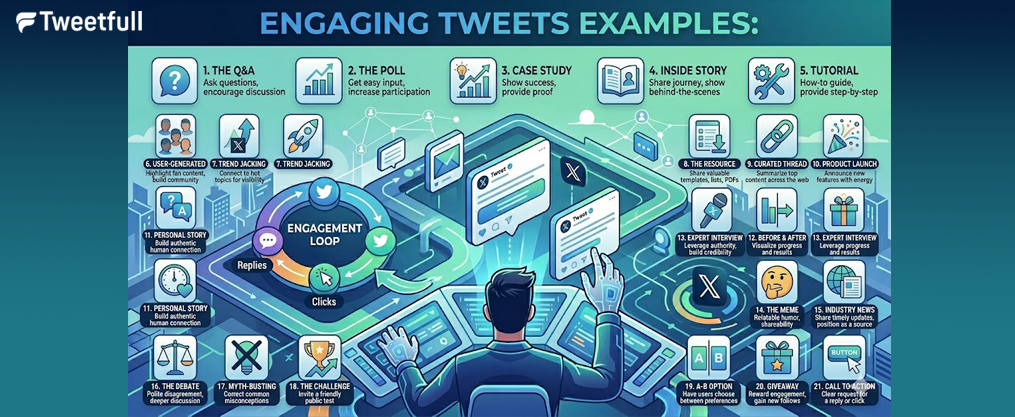
Engaging Tweets Examples: 21 Proven Tweet Types That Actually Get Replies, Clicks, and Follows
Your twitter feed moves fast. With over 500 million posts flooding X daily, most tweets vanish into the void within seconds. The difference between a tweet that sparks conversation and one that flatlines often comes down to structure, timing, and a few deliberate choices.
This guide delivers 21 concrete engaging tweets examples you can adapt and post today. No vague advice—just ready-to-use formats backed by current engagement data.
Key Takeaways
- Engagement rates on X climbed 19% year-over-year (from 1.32% to 1.58%), signaling that active participants now drive the platform more than passive scrollers. Retweets jumped 35% to an average of 6.67 per post.
- Visual content dominates: tweets with images earn 34-94% more engagement, while video tweets generate up to 10x engagement and are 6x more retweetable than photos alone.
- Optimal tweet length hovers around 120-140 characters for maximum CTR and reply rates. The “three C’s” principle—concise, clear, conversational—remains the backbone of high performers.
- Active brands post 8-15 times daily, mixing questions, stories, polls, visuals, and soft promotions. Consistency over 30-60 days matters more than sporadic viral attempts.
- Every example in this article is written as a real, ready-to-post tweet—not a template. Swap in your niche, replace metrics with your own data, and adjust tone to match your twitter audience.
Why Engaging Tweets Matter in 2026
X processes over 500 million twitter posts every single day. Your content competes against breaking news, memes, industry hot takes, and the endless scroll of entertainment. Stopping that scroll is the real battle.
“Engagement” in 2026 means more than likes. The algorithm now prioritizes high-intent signals: replies (averaging 2.56 per post), quote tweets, profile visits, bookmarks, and link clicks. These actions feed the “For You” algorithm far more powerfully than a quick double-tap. Likes are now viewed as low-effort “social nods” that carry less weight.
The numbers tell the story: image tweets drive approximately 35% more engagement than text-only posts. Video tweets generate up to 10x engagement and are 6x more retweetable than photos. Twitter polls dramatically lift reply counts by lowering the barrier to participation. Sports teams lead with a median 0.073% engagement rate versus the overall 0.015%, driven by real-time events.
Why does this matter for your growth? Higher tweet engagement translates directly to more twitter followers, warmer leads, increased newsletter signups, higher webinar attendance, and more product trials. One creator grew their email list from 900 to 4,500 subscribers in months by consistently posting value-first content.
The rest of this article focuses on concrete, copy-paste-ready engaging tweet examples grouped by format. Let’s start with seven you can schedule today.

Quick-Start: 7 Engaging Tweet Examples You Can Post Today
This is the “ASAP” section. You can literally schedule these today with light edits for your twitter account.
1. Question Tweet: “What’s the one tool you couldn’t run your business without in 2026? Mine: Notion. Changed how we plan everything.”
Why it works: Opens with curiosity, shares a specific answer, invites easy replies.
2. Mini-Story Tweet: “January 2026: 3 demo requests per week. February: Added a 90-second video shot on my iPhone. March: 40+ requests weekly. Sometimes the fix is simpler than you think.”
Why it works: Concrete timeframe, specific numbers, relatable lesson.
3. Trend Reaction Tweet: “New X algorithm update just dropped. Tested it for 6 hours. Early verdict: replies now matter 2x more than likes. Your engagement strategy needs to shift—here’s what I’m changing.”
Why it works: Timely, specific testing, promises actionable insight.
4. Poll Tweet: “Building a new content course. Which format would you actually complete? A) 5 short videos B) 1 deep-dive workshop C) Daily email lessons D) Self-paced PDF guide”
Why it works: Involves audience in decisions, low-friction engagement.
5. Meme/Visual Tweet: “Me explaining to my team why we need to post 10x a day now (Photo: dog at whiteboard with complex diagrams)”
Why it works: Humor plus industry relevance creates shareability.
6. Soft-Sell Tweet: “Client feedback from last week: ‘Your Notion template saved our team 15 hours weekly on content planning.’ Grab it free in my bio—built it after testing 12 other systems.”
Why it works: Social proof, specific outcome, clear CTA without hard sell.
7. Thread Opener Tweet: “How we grew MRR from $2k to $18k between October 2025 and March 2026 (5 steps + screenshots) 🧵”
Why it works: Specific metrics, clear promise, signals depth ahead.
How to customize these:
- Swap in your niche and industry language
- Replace metrics with your own real numbers
- Adjust tone: more casual for creators, more polished for B2B
Foundations: What Makes a Tweet Engaging?
Before diving into more examples, let’s clarify what separates scroll-stoppers from scroll-past. The engaging tweets examples in later sections deliberately apply these fundamentals.
Engagement isn’t just about getting likes. High-intent engagement—replies, profile visits, DMs, link clicks—drives actual business outcomes. A tweet with 50 thoughtful replies often outperforms one with 500 likes when it comes to follower growth and retweets.
Five core elements of engaging tweets:
- Hook in the first 3-5 words: Your opening must interrupt the scroll. “Here’s what nobody tells you…” beats “I wanted to share some thoughts…”
- Specificity: Dates, numbers, and tangible outcomes. “Grew followers from 1,200 to 5,400 in Q1 2026” hits harder than “grew my following significantly.”
- Emotion and human voice: People connect with people. Share real struggles, real wins, real opinions.
- Clear angle: Question, opinion, story, or tip. Mixed messages confuse readers.
- Soft call-to-action: “What would you add?” or “Reply with yours” converts passive readers into participants.
Consider the difference: “Social media is important for business” versus “Lost my biggest client because I ignored DMs for 3 weeks. Never again. Now I check them twice daily—here’s my exact routine.” The second version uses specificity, stakes, and a hook.
The distinction matters: “vanity metrics” like likes feel good but don’t necessarily drive growth. “High-intent” signals like replies, retweets, and clicks are what build your twitter followers and warm up leads.
The sections ahead group tweet ideas by goal: conversation, authority, promotion, and community. Each applies these principles.
Conversation-Starters: Question and Opinion Tweet Examples
Questions and opinions are the fastest path to replies and quote tweets. They lower the barrier for your twitter audience to participate.
Question Tweet Examples:
“This or that for scheduling social media posts in 2026: Buffer or native X scheduling? I switched—curious what you use.”
“Unpopular opinion check: Cold DMs still work better than cold emails for landing B2B clients. Agree or disagree?”
“What was your first 10-client acquisition channel? Referrals? Cold outreach? Content? Mine was surprisingly LinkedIn carousels.”
“Which AI writing tool actually saved you time in Q1 2026? Need recommendations that aren’t just hype.”
“Freelancers: What’s one boundary you wish you’d set with clients from day one?”
Opinion Tweet Examples:
“Hot take: Your content strategy matters more than your posting frequency. I’ve seen accounts posting 3x daily outperform those posting 15x—because every single tweet delivered value.”
“Controversial opinion backed by data: Threads are overrated for most accounts. Single tweets with strong hooks converted 2x better for us in February 2026.”
“I stopped chasing viral content in January. Focused on 100 true fans instead. Revenue actually increased. Sometimes smaller is better.”
After posting conversation-starters:
- Reply to at least 5-10 answers personally
- Quote-tweet the best replies to extend the conversation
- Save high-performing questions to reuse 4-6 weeks later with fresh angles
Story-Based and Relatable Tweet Examples
Micro-stories (2-4 sentences) outperform vague advice because they’re memorable and human. Your target audience connects with real experiences, not abstract tips, and the most engaging tweets that boost interaction usually tap into specific moments.
Story Tweet Examples:
“August 2025: Spent $2,000 on twitter ads. Result: 12 followers. January 2026: Posted behind the scenes content daily for 30 days. Result: 840 new followers, zero ad spend. The lesson hit hard.”
“Mistake I made in Q4 2025: Automated all my replies. Thought I was being efficient. Lost 3 potential clients who wanted real conversation. Now I batch replies manually—takes 20 minutes daily but converts 5x better.”
“Shot our demo video on an iPhone 13 at 11 PM in my kitchen. Terrible lighting. Posted anyway. It outperformed our $3,000 professional video 4 to 1. Sometimes ‘good enough’ wins.”
“From 3 signups a week to 40+ in March 2026. What changed? Added one line to our landing page: ‘Used by 200+ freelancers.’ Social proof isn’t optional anymore.”
“Building in public update: Newsletter subscribers went from 900 in October 2025 to 4,500 by February 2026. The biggest lever? Weekly twitter threads summarizing my blog content. Repurposing > creating from scratch.”
Tips for story tweets:
- Keep stories under 4 lines
- Avoid generic morals (“consistency is key”)
- End with a question or reflection to invite replies
Educational and Value-First Tweet Examples
Value tweets—tips, frameworks, mini-guides—build authority and save your twitter followers time. These position you as someone worth following for ongoing insights and help you master creating engaging Twitter post content.
Educational Tweet Examples:
“3-step AI content batching that doubled our output in Q1 2026:
- Monday: Research trending topics
- Tue-Thu: Batch 15 posts with AI assist
- Friday: Schedule via native tools Total time: 4 hours/week”
“Content calendar that actually works: Mon: Value tip Tue: Question Wed: Story Thu: Poll Fri: Thread Sat-Sun: Reposts + replies Grew audience 2x using this exact structure.”
“5 tweet types that generate conversations (not just likes): • Questions starting with ‘which’ or ‘would you’ • Mini case studies with numbers • Polls with 4 clear options • Quote tweets adding your take • Thread openers with specific outcomes”
“Quick tip for crafting compelling tweet copy: Write the hook first, delete your first sentence, then start with what was your second sentence. Works 80% of the time.”
“Tools I actually use daily for digital marketing in 2026: • Scheduling: TweetDeck • Analytics: Native X • Research: SparkToro • Writing assist: Claude That’s it. Simple stack, consistent results.”
“Creating quality blog content? Repurpose into multiple tweets: • Extract 3 key stats as standalone posts • Turn each H2 into a tip tweet • Use the conclusion as a thread opener One blog post = 10+ twitter content ideas”
Tips for value tweets:
- Focus on 1 narrow problem per tweet
- Keep tips extremely specific and actionable
- Occasionally link to deeper resources (blog posts, newsletter) with a clear CTA

Visual, Meme, and Screenshot Tweet Examples
Visual content dramatically increases engagement on this social media platform. Tweets with images earn 34-94% more engagement, making visuals essential for your twitter strategy if you want to get more views on Twitter.
Visual Tweet Examples:
“Before: 0.8% CTR on our landing page After: 2.4% CTR The only change? Added a 30-second video above the fold. (Photo: Side-by-side dashboard screenshots from Jan-Mar 2026)”
“Every content creator in 2026 when the algorithm changes again (Photo: Person dramatically throwing papers in the air)”
“How we structure every client onboarding: Step 1: Discovery call Step 2: Audit Step 3: Strategy doc Step 4: Implementation Step 5: Review (Carousel: 5 images showing each step visually)”
“POV: You’re explaining to your boss why posting consistently matters more than posting perfectly (Photo: Dog explaining something to confused cat)”
“Our twitter analytics dashboard after testing 30-second videos for 6 weeks. The spike in February tells the whole story. (Screenshot: Analytics graph showing engagement spike)”
“When you finally crack the code on twitter engagement after 6 months of testing (Photo: Person celebrating at desk with arms raised)”
Tips for visual tweets:
- Keep on-image text minimal for mobile readability
- Ensure images are clear without needing to zoom
- Subtly include brand colors without overwhelming the feed
- Users incorporating gifs often see higher engagement than static images
Trend, Newsjacking, and Real-Time Reaction Tweet Examples
Timing matters. Reacting to trending topics, product updates, or cultural moments can drive disproportionate reach—35% more retweets on average for trend-relevant content and is a core part of getting traction on Twitter.
Trend Reaction Examples:
“New X AI feature just dropped. Here’s the 3-line prompt that 10x’d my replies today: ‘Analyze my last 20 tweets. Identify which hooks performed best. Generate 5 variations for testing.’ #XUpdate”
“Everyone’s talking about the new creator monetization changes. Here’s what actually matters for accounts under 10k followers: [specific breakdown]. The headline numbers are misleading.”
“Live from the digital marketing conference in Austin—3 insights that will change how I approach Q2 2026:
- Video thumbnails matter more than titles
- Engagement in first hour determines reach
- Threads are evolving into carousels”
“Quote-tweeting @BigAccountAnnouncement: ‘Interesting take, but here’s what’s missing from this analysis: the mid-size account perspective. We tested this approach in February and saw opposite results. Here’s our data…’”
“Industry news just dropped: AI regulation affecting content tools. Before you panic, here’s what this actually means for creators (spoiler: probably less than headlines suggest)”
Live tweeting tips for any conference or networking event:
- Use the event hashtag consistently
- Share one valuable information point per tweet
- Tag speakers when adding your take on their insights
Tips for trend tweets:
- Only join trends relevant to your audience
- Avoid sensitive or polarizing topics
- Save evergreen takeaways for later repurposing
Polls, Feedback, and Audience Research Tweet Examples
Twitter polls and feedback tweets lower the barrier to engagement while doubling as lightweight user research. X’s built in polling capabilities make this effortless, especially as the platform explores better engagement and safety strategies.
Poll Tweet Examples:
“Planning our April 2026 webinar. Which time works best for you? A) 10 AM ET B) 2 PM ET C) 5 PM ET D) Evening replay only I’ll share results + schedule tomorrow”
“Content format experiment: What would you actually watch? A) 60-second tips B) 10-minute deep dives C) 30-minute workshops D) Podcast-style discussions”
“Reply with your answer: First automation tool you’d recommend to a new freelancer in 2026? Collecting these for a resource guide.”
“Quote tweet this with your current tech stack for content creation. I’ll share the most common tools next week.”
“Rate our new landing page from 1-10 (link in replies). Honest feedback only—we’re iterating this week.”
Poll supporting business decisions:
“Feature priority for Q2 2026—which matters most to you? A) AI writing assistance B) Analytics dashboard C) Team collaboration D) Template library This directly shapes our roadmap”
Tips for polls:
- Keep poll options mutually exclusive and clear
- Follow up with a separate tweet summarizing results
- DM a few thoughtful respondents to deepen relationships
- The built in gif library can add personality to follow-up announcements
Thread and Mini-Guide Tweet Examples
A twitter thread remains powerful for depth, but your hook tweet must stand alone. The first tweet determines whether anyone reads the rest, which is why understanding Twitter threads as a social media phenomenon matters.
Thread Opener Examples:
“How we went from 900 to 4,500 email subscribers between October 2025 and February 2026 (5 steps + screenshots) 🧵”
Follow-up tweets would cover: repurposing blog content, twitter thread strategy, lead magnet optimization, cross-promotion tactics, and the exact tools used.
“Setting up X ads that actually convert in 2026—a step-by-step breakdown from our $50k in ad spend (thread)”
Follow-up tweets would cover: audience targeting settings, creative formats that work, budget allocation, tracking setup, and common mistakes to avoid.
“Everything I learned from 3 years running a solo marketing agency. 15 lessons I wish I knew at the start. 🧵”
Follow-up tweets would cover: pricing mistakes, client red flags, systems that saved time, revenue diversification, and mental health boundaries.
“The complete guide to creating quality blog content that ranks in 2026—condensed into 10 tweets (thread)”
Follow-up tweets would cover: keyword research shortcuts, outline structure, SEO optimization, promoting via social media, and repurposing for multiple tweets.
Tips for threads:
- Keep each tweet in a thread self-contained and valuable alone
- Use 1 main visual per thread (usually in tweet 2 or 3)
- Repost top-performing threads after 4-6 weeks with updated data
- Your final tweet should include a clear CTA
Soft Promotion and Social Proof Tweet Examples (Without Feeling Spammy)
Not all engaging tweets are purely educational. Some should nudge people toward products, services, or content assets. The key is blending value with promotion in every promotional post.
Soft Promotion Examples:
“Problem: Spending 10+ hours weekly on content planning Solution: Built a Notion template that cut it to 2 hours Result: 200+ creators now using it Grab it free in bio—feedback welcome”
“What changed after using our AI audit tool for 6 weeks: • CTR: 0.8% → 2.4% • Time on page: 45s → 2:30 • Bounce rate: 70% → 41% Free trial in bio if you want to test it yourself (Photo: Before/after dashboard)”
“Client testimonial from this morning: ‘Your content calendar template saved us from the chaos of posting consistently without a plan.’ (Screenshot of actual DM) Template link in thread below—it’s the same one we use internally.”
“Behind the scenes of our upcoming launch: We’ve been testing this feature for 4 months with 50 beta users. The results are exciting news we can finally share. Early access opens April 15.”
“Just published a breakdown of how we boost customer engagement using twitter analytics. 2,500 words of exactly what we do quarterly. Link in replies—no email required.”
“Quick thread on the 3-step process we use to create posts that spark engagement. Then at the end, I’ll share the template we built around it (free).”
Tips for promotional tweets:
- Cap overt promos at ~20-25% of total tweets
- Avoid hard-sell language (“Buy now!” or “Don’t miss out!”)
- Always anchor promotions in outcomes users care about: time saved, revenue gained, clarity achieved
- Promoted tweets work best when they mirror organic engaging content
Scheduling, Testing, and Iterating Your Best-Performing Tweet Types
Consistent posting plus testing transforms these examples into a sustainable growth system. Your twitter efforts compound when you approach content systematically.
Build a simple content calendar (or use a dedicated Twitter content calendar tool):
Day | Theme | Example Format |
|---|---|---|
Monday | Value tip | Educational tweet |
Tuesday | Story | Behind the scenes or lesson learned |
Wednesday | Engagement | Poll or question |
Thursday | Trend reaction | Industry news commentary |
Friday | Thread or recap | Deeper dive content |
Weekend | Reposts + replies | Community engagement |
Active brands post 8-15 times daily, but beginners should start with 3-8 quality posts and scale up. |
A/B testing examples:
Test the same core message with different hooks:
- Version A: “Here’s what nobody tells you about twitter engagement…”
- Version B: “I was wrong about twitter engagement. Here’s what actually works…”
Track which version earns more replies and profile visits using twitter analytics over 48 hours.
Create a tweet library:
Build a swipe file of your high-performing tweets tagged by type (question, story, poll, thread opener) and key metrics (replies, retweets, profile visits). Export this data monthly for analysis or turn the best ones into high-performing Twitter threads that drive engagement.
Review ritual: Every month, export analytics, tag winners, rewrite top tweets with fresh angles, and plan 1-2 new experiments for the coming month.
Monitor engagement metrics weekly, but make strategy decisions monthly. Daily fluctuations mean nothing; 30-day patterns tell the real story.
Monthly review checklist:
- Export and analyze last 30 days of twitter analytics
- Identify top 5 different tweets by engagement type
- Rewrite winners with fresh hooks or updated data
- Plan 1-2 new formats to test in the coming month

FAQ: Engaging Tweets and Examples
How many engaging tweets should I aim to post per day if I’m just starting?
Beginners can start with 3-8 tweets per day. A solid mix includes 1-2 questions, 1 story or tip, 1 piece of valuable content, and 1-2 genuine replies to other users’ tweets. This keeps your twitter account active without overwhelming you.
Gradually increase toward 8-12 tweets daily as you build a library of proven examples and get comfortable with scheduling tools. Consistency over 30-60 days matters far more than sporadic bursts of 20+ posts. Your audience engaged regularly beats your audience overwhelmed occasionally.
Can I reuse the same tweet example more than once?
Reusing is not only acceptable—it’s smart strategy. High-performing tweets can be reposted every 4-8 weeks with minor changes to the hook, visual, or CTA. Track dates in a simple spreadsheet so the same example isn’t repeated too frequently.
Time zones, new followers, and algorithm behavior mean many people never saw the first version. Your best tweets deserve multiple chances to reach more primarily visual platforms users who scroll at different times.
How should I deal with negative or trolling replies on engaging tweets?
Separate genuine criticism from bad-faith trolling. Respond calmly and briefly to real concerns—this shows your twitter audience you listen. Ignore or mute obvious trolls using X’s built in moderation tools.
Set simple internal guidelines: when to reply publicly, when to take a conversation to DMs, and when to block if someone becomes abusive. A few negative replies won’t ruin engagement and can even signal that a topic is thought-provoking. Focus on the majority positive response rather than the outliers.
How can I adapt B2C-style engaging tweet examples for a B2B or personal brand?
The tweet structure stays the same—hooks, questions, stories all work across contexts. The references should shift from consumer products to business outcomes: revenue growth, leads generated, team efficiency, client wins.
Replace pop-culture memes with industry jokes, case studies, or data visualizations relevant to decision-makers on more professional platforms. Maintain a human tone even in B2B by telling real stories from projects, clients, or career milestones. Your character limit doesn’t change, but your vocabulary should match your audience.
Holiday posts and brand announcements work for B2C; case studies and industry analysis work for B2B. Both can use the same underlying formats to create buzz and increase engagement.
How long does it usually take to see results from improving tweet engagement?
With consistent posting and testing, most accounts notice clearer engagement patterns within 30 days. More substantial reach and follower growth typically emerge within 60-90 days of focused twitter content improvement.
Early weeks are about learning which examples resonate. Track replies, profile visits, follows, and link clicks—not just likes. These key metrics indicate actual audience interest. Nearly any platform rewards consistency, and X is no exception.
Commit to one 90-day experiment using the tweet types in this article. Pick 2-3 formats from earlier sections and test them this week rather than trying all formats at once. Your twitter strategy will sharpen through focused iteration, not scattered attempts across every possible approach.