
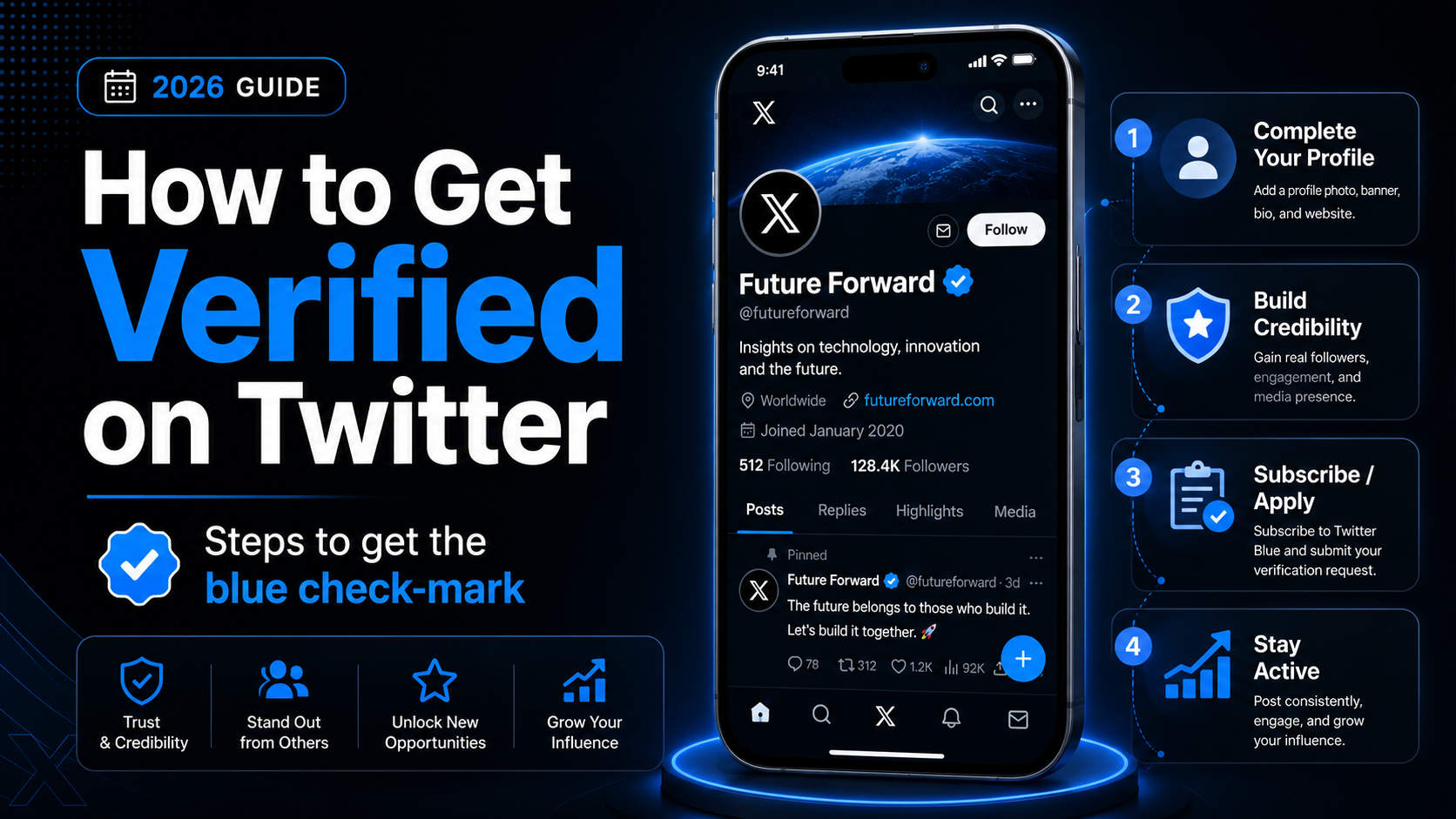
How to Get Verified on twitter – Steps to get the blue check-mark
The blue verified badge on a Twitter account is surely not new and has helped differentiate official accounts from regular ones for quite some time now. If you’re wondering how to get verified on Twitter, the short answer is that your account must subscribe to X Premium and meet the following criteria: stay active, avoid being a fake account, and keep a complete profile with a profile photo, bio, confirmed phone number, and email address.
One of the highest forms of authority on social media is getting a verification logo next to your user id. Sounds much like being a celebrity, right? That is exactly why individuals, businesses, creators, influential individuals, public figures, news outlets, government accounts, and other organizations pursue a verified account—it helps protect an official account from account claiming and impersonation while building trust with new users who find you in feeds or search results.
People are crazy to see the badge placed near their names; especially on Instagram and Twitter. Usually, on Twitter, the accounts that get verified belong to the fields of entertainment, music, fashion, politics, religion, government, sports, media, product business, and other interest areas that are popular among people, especially top Twitter influencers. The verified Twitter account badge is given to accounts that already have a strong social presence on Twitter, are of public interest, and have a relatively high following and engagement, although there is no minimum follower count required in 2024.
With the move from the legacy verification program to Twitter Blue, the process has changed significantly. Twitter announced plans to begin winding down legacy verification, and the platform later shifted verification to a paid subscription service now called X Premium. To obtain the blue checkmark, you need an active X Premium subscription, and the application process happens through your account settings, where you start request steps for subscription and verification. Twitter requires your account to be in good standing, and for some features, such as ID verification, you may be asked to upload a government-issued photo ID like a driver’s license. Government organizations and notable accounts may also receive special labels such as gray or gold checkmarks to mark official status.
Now, obviously, not every single person can get this blue badge of authenticity because that would defeat the whole purpose of it. Verification is not permanent and can be revoked if you violate Twitter’s rules or change your profile details frequently. In this guide, you’ll see who qualifies, how to optimize your profile, how the verification steps work, and what benefits a verified badge can bring for credibility, visibility, and engagement on the platform.
So, do you want your own verified Twitter account? Want to know about the process and the pre-requisites? Then let’s learn about the steps that you need to follow and the requirements for getting that white checkmark floating in the blue cloud on your Twitter handle.
Introduction to Twitter Verification
Twitter verification is a process designed to help users prove the authenticity of their Twitter account and stand out as credible voices on the platform. A verified Twitter account is marked by the iconic blue checkmark next to the profile name, signaling to other Twitter users that the account has met Twitter’s strict eligibility criteria. This verification badge is more than just a status symbol—it’s a sign of trustworthiness, helping official accounts, public figures, and organizations distinguish themselves from impersonators and fake accounts. Posts from verified accounts receive about three times the engagement compared to non-verified accounts.
In recent years, Twitter has revamped its verification system, moving away from the legacy verification program to a new model centered around Twitter Blue, now known as X Premium. Under this updated verification program, users can request verification by subscribing to a premium account. X Premium costs $8 per month on the web and $15 per month on mobile. This subscription unlocks premium features, including the ability to request verification directly through the Twitter app or desktop site. The verification process is straightforward and typically takes up to a week, after which your account, if approved, will display the blue checkmark, confirming your verified status. The blue checkmark is now available to anyone who meets basic eligibility requirements and subscribes to X Premium.
To get verified on Twitter, you must meet several basic eligibility requirements. These include having a complete profile with a profile photo, display name, and concise bio, as well as a confirmed phone number and a valid email address. Only active accounts are eligible for verification—private accounts, fake accounts, and those engaging in platform manipulation are not considered. Maintaining an active presence and keeping your account information up to date is essential, as failing to meet these criteria can put your verified status at risk.
Twitter verification isn’t limited to individual accounts. Verified organizations, including businesses, non-profits, and government agencies, can also apply for verification. These official accounts receive a gray or gold checkmark, depending on their category; government accounts receive a grey checkmark through a separate verification process managed by X rather than a public subscription service, while organizations get a gold checkmark through the Premium Business plan, which costs significantly more than an individual subscription. Verified organizations and affiliated accounts benefit from increased visibility and credibility, making it easier to connect with their audience and other verified users.
By getting your Twitter account verified, you not only enhance your social media marketing strategy but also gain access to exclusive premium features and a stronger Twitter presence. Whether you’re an individual, a business, or a government agency, the verification badge helps you build trust, reach a wider audience, and establish your account as an authoritative source on the platform. Verified users often notice their follower count climbing faster than non-verified users. Remember, to keep your account verified, you must continue to meet Twitter’s eligibility criteria and maintain an active subscription to Twitter Blue or X Premium.
Getting a Verified Twitter Account
Before getting verified on Twitter, your account needs to have certain elements in order to be considered for verification. Build a super strong profile before starting the application process, so that your application gets approved quickly. Having a complete and professional Twitter profile, including a high-quality profile image, detailed bio, and highlighted achievements, significantly increases your chances of verification.
1. A profile picture
A profile picture is one of the first indicators of identity that people notice when they visit your profile. Make sure that you have set a profile picture of yourself (in which your face clearly shows) if you are a Twitter influencer or a public-figure.
If you’re a business, you can set your brand logo as your profile picture instead, to instantly let people know the purpose of your Twitter account. Also, do not upload a picture that is low in quality or blurry. It will reduce the chances of your account being verified. Nobody would like to do the hard work of trying to recognize you by a blurry profile picture, including Twitter officials.
2. A well-written bio
A bio helps give people info about you or your business. A well-written bio is short, informative, sometimes funny, and accurate in representing your public identity. A well-optimized Twitter bio can also help with verification by clearly highlighting your achievements and affiliations.
A profile with a well-written bio is more likely to be considered for verification than a profile that has no bio. Including mentions of verified accounts, organizations, or affiliated handles in your bio (bio adding mentions) can further enhance your credibility, help distinguish an official account from a fake account, and support your verification application.
3. Tweets set to ‘Public’
Obviously, it wouldn’t make sense to apply for a public verification badge if your tweets aren’t public for people to see!
To make sure that your Tweets are set to Public, go to your account > Click ‘More‘ > Click ‘Settings & Privacy‘ > Click ‘Privacy & Safety‘ > Uncheck ‘Protect your Tweets‘.
If you have turned on ‘Protect your Tweets‘, your Tweets will only be visible to your followers and not to the people who visit your profile who are not following you.
If they can’t see your Tweets, they obviously wouldn’t be able to see if your content is relevant and useful to them and you will consequently lose a lot of potential followers. So make sure to have that option turned off.
4. Add your birthdate
This one is simply to help Twitter in identity confirmation of your account. It applies to individuals and not companies, but increases your chances of getting verified.
An account with a valid birth date is easily distinguishable from a bot account and helps confirm the authenticity of your account.
5. A valid email address
An authentic, functioning email address is one of the most important factors in getting a verified badge on Twitter. Twitter requires a valid email as part of the following criteria for verification readiness. If you are a business, it is recommended that you use your business email address and not your personal Gmail address.
6. A valid phone number
Adding a valid phone number further helps Twitter in the verification process and also to undertake some offline activities. Having a verified phone number is a key eligibility requirement for account verification and serves as a sign of authenticity. It is one of the strongest indicators of credibility. Your account must have a confirmed number before you can start request steps for verification.
7. Your website
As a business, it is essential that you add your business website to your Twitter account so that you can have an additional source from where people can visit your homepage.
Not to mention how this also helps in speeding up the verification process as a website is a piece of solid evidence for a valid business identity.
8. Your header photo
Your header or background photo is the place to get creative. What you should choose to put up as a header photo, however, depends highly on your nature of work, industry, your public relations, and a lot of other things. You can put up a banner that shows a newly launched product, ongoing discounts, giveaways, or you can simply keep a list of services that you provide.
But most importantly, your header photo should be relevant above all else. It’s what will help separate your account from the crowd, and also be accepted by one.
Maximizing Probability of Getting Verified Twitter account
1. Relevant Tweets
Now comes the part that sounds obvious, but isn’t. If you as a business are constantly tweeting about things that are not relevant to your industry, the probability of getting a verified Twitter badge drops dramatically.
Your Tweets should represent what you as a business believe in and the products/services that you are offering, which also makes your account appear more credible in search results.
2. Stay active and tweet regularly
Post more, post often. It not only increases the odds of getting your Twitter account verified, but also builds engagement and helps you in increasing your followers
If your account is not active enough, you’ll have almost nill engagement rates, and it is a direct signal that people don’t bother if your account exists or not.
Also, before applying for verification, your account must be active within the last 30 days to give X an indication that you are active on the platform. Your X account must also be older than 90 days after subscribing to X Premium before it is eligible for verification.
3. Be precise
Include specifics in your bio. You can mention Twitter handles of other people in the bio section – your current employer, past employer, partners, your parent companies, or the venture capitals that funded you.
4. Show your accomplishments
Boast a bit and praise yourself. Showcase all your accomplishments and be self-promotional, since this helps influential individuals and other high profile accounts demonstrate public interest. You can write about the number of years that you have completed in the industry, or about how many clients you have served. Talk about any awards that you have received or any noteworthy articles that you have published.
You can also include your highest job title and mention the company next to it. Let people know about your unique achievements, which is especially useful for notable accounts seeking verification.
Once you have updated all the information and made your account ready, the final step is to apply for verification.
To fill out the verification form, you need to go to ‘verification.twitter.com/request‘. While on the page, you will have to fill in the following information:
1. Twitter username
Enter the Twitter handle of the account that you want to get verified. It would be great if there are less or no numbers in your username.
2. Checkbox for Businesses
If you have a business account, then mark the checkbox that says “Check here if this is a company or a brand or organization account”.
3. Website links
Next, you’ll have to add links to at least 2 websites that will help Twitter identify you. You can add a maximum of 5 links.
Try to fill in all of them in order to increase your chances of getting a verified Twitter account. Do not enter your business website as it is already there on the profile. It would be great if you give links to websites that show your public influence, including coverage or references from news outlets when relevant.
4. Reason for why your Twitter account should be verified
After that, Twitter will ask you to write a paragraph explaining why you should be verified. You will have only 500 characters to explain how your account meets the following criteria for verification, so be crisp and clear.
If you are an individual, show your public impact. If you are a brand, write about your vision and missions, explain your service clearly, and how your are achieving them.
Show how it can help the Twitter community when your account gets verified. In short, focus on how you will add value to Twitter overall.
5. Submit the application
Double-check all the details that you have filled and hit Start request.
Once you have submitted the application, a summary will appear on the screen and you will receive a confirmation message saying that your application is under review.
Now, all you can do is wait for their reply. Twitter will send you an email as soon as they make a decision. You’ll also know that your account is verified if @verified Twitter account follows you. If your application is rejected, don’t worry, you can go through the application process again after 30 days.
The acceptance or rejection of applications is exclusively in the hands of Twitter’s authorities. If you have any doubts or disagree with their decision, you can contact them through the help centre by visiting “https://help.twitter.com/forms”.




One Comment
Comments are closed.